Introduction
Enterprise environments face thousands of new software vulnerabilities every year, yet many organizations remain dangerously exposed simply because patches weren't applied in time. Consider the WannaCry ransomware attack of 2017 - a patch had been available for 59 days before the outbreak infected tens of thousands of systems across over 150 countries. Similarly, Equifax's failure to apply a patch for Apache Struts CVE-2017-5638 led to a breach that exposed 147 million consumers' personal data and cost the company at least $575 million in settlements.
According to the 2024 Verizon Data Breach Investigations Report, vulnerability exploitation surged by 180% as the primary path to breach initiation. Organizations now take approximately 55 days to remediate just 50% of critical vulnerabilities after patches become available, giving attackers a wide-open window to exploit known weaknesses.
This article provides enterprise IT and security teams with a clear, practical roadmap to security patch management, covering the complete lifecycle, common challenges, and proven best practices that reduce risk without disrupting operations.
Overview:
- Unpatched vulnerabilities caused a 180% surge in breaches, with attackers exploiting known flaws faster than enterprises deploy fixes
- Compliance frameworks like PCI DSS v4.0.1 now mandate 30-day windows for critical patches, with cyber insurers scrutinizing patch programs
- Effective patch management runs on two tracks: routine maintenance cycles and rapid emergency remediation
- Risk-based prioritization using CVSS scores and threat intelligence focuses limited resources on the highest-impact vulnerabilities
- Automated deployment and compensating controls for exceptions keep patching consistent without disrupting operations
What Is Security Patch Management?
Security patch management is the structured, ongoing process of identifying, acquiring, testing, and deploying software updates (patches) across an organization's technology environment to close known vulnerabilities, fix bugs, and maintain compliance.
Unlike unplanned or purely reactive updates, effective patch management operates as a continuous, repeatable lifecycle governed by documented policies, clear ownership, and measurable timelines.
Understanding Key Terminology
Enterprise teams encounter several types of updates that require different approaches:
- Patches - Fix specific vulnerabilities without introducing new features or functionality
- Updates - Broader releases that combine security fixes with feature additions or improvements
- Hotfixes - Urgent, out-of-band (unscheduled) fixes for critical zero-day vulnerabilities that can't wait for the next maintenance window
Enterprise-Wide Scope
Patch management applies across the full enterprise stack, not just desktop software:
- Operating systems (Windows, Linux, macOS)
- Third-party applications (browsers, Java, Adobe products)
- Network equipment firmware (routers, switches, firewalls)
- Cloud workloads and containers
- Remote endpoints and mobile devices
- Virtualization platforms and hypervisors
A single unpatched layer - even a rarely-used network device or legacy application - is enough for attackers to gain a foothold. That's why comprehensive asset visibility is the foundation of any effective patch program.
Why Patch Management Is Critical for Enterprise Security
Unpatched Vulnerabilities Remain the Top Attack Vector
The 2024 Verizon Data Breach Investigations Report documented a 180% increase in vulnerability exploitation as the critical path action to initiate breaches. Attackers systematically scan for known CVEs (Common Vulnerabilities and Exposures) and target organizations that lag on patching. The 2023 IBM Cost of a Data Breach Report put the average cost of a breach tied to known, unpatched vulnerabilities at $4.45 million - a figure that makes delayed patching one of the most expensive decisions an enterprise can make.
The Cost of Inaction: WannaCry and Equifax
Two enterprise breaches illustrate the consequences of delayed patching:
| Incident | Vulnerability & Patch Date | Exploitation Window | Impact & Damages |
|---|---|---|---|
| WannaCry (2017) | MS17-010 released March 14, 2017 | Outbreak began May 12, 2017 (59 days post-patch) | Tens of thousands of infections across over 150 countries |
| Equifax (2017) | Apache Struts CVE-2017-5638 patched March 7, 2017 | Attackers accessed systems from May 13 to July 30, 2017 | FTC settlement of at least $575 million, potentially up to $700 million |
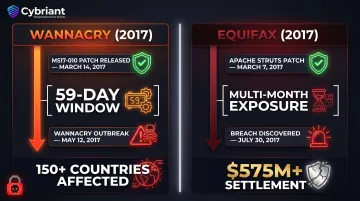
Both incidents resulted from failures to apply patches that were already available. The 59-day gap in WannaCry and the multi-month exposure in Equifax demonstrate that attackers actively exploit the lag between patch release and enterprise deployment.
Compliance Mandates and Audit Requirements
Regulations explicitly require timely patching with specific deadlines based on severity:
- PCI DSS v4.0.1 - Critical vulnerabilities must be patched within 30 days of release
- CISA BOD 22-01 - Federal agencies must remediate known exploited vulnerabilities within two weeks
- NIST SP 800-53 Rev. 5 - Organizations must install security-relevant updates within defined time periods and establish benchmarks for corrective actions
Non-compliance results in fines, failed audits, loss of certifications, and potential suspension of operations in regulated industries like healthcare and financial services.
Beyond Compliance: Operational and Financial Stakes
The case for patching extends beyond regulatory deadlines:
- System stability - Patches fix software bugs and performance issues alongside security flaws, reducing unplanned outages and protecting SLA commitments
- Cyber insurance eligibility - Insurers increasingly require documented patch management programs as a condition of coverage; gaps can mean higher premiums, restricted policies, or outright denials
- Audit readiness - A consistent patching record provides auditors with evidence of due diligence, reducing scrutiny during assessments
The Enterprise Patch Management Lifecycle
Effective patch management is a continuous, repeatable lifecycle that demands a structured process. Enterprise environments face constant pressure to manage patching volume, complexity, and speed across thousands of endpoints and diverse system types.
Asset Inventory and Discovery
Comprehensive patch management begins with an accurate, continuously updated inventory of all IT assets:
- Servers and workstations
- Cloud instances and containers
- Network devices and IoT endpoints
- Third-party software installations
Without full visibility, teams cannot know what needs patching. Automated discovery tools detect new assets as they join the network, including shadow IT that bypasses standard procurement, closing off unmonitored entry points before they can be targeted.
Risk-Based Prioritization
Enterprises use the Common Vulnerability Scoring System (CVSS) combined with threat intelligence to decide patch urgency. CVSS provides qualitative severity ratings:
| Qualitative Rating | CVSS Score Range |
|---|---|
| Critical | 9.0 - 10.0 |
| High | 7.0 - 8.9 |
| Medium | 4.0 - 6.9 |
| Low | 0.1 - 3.9 |
A tiered prioritization model helps teams focus limited resources on the highest-risk gaps:
- Critical vulnerabilities - Immediate emergency patching
- High severity - Within 72 hours to 7 days
- Medium severity - Within 30 days
- Low severity - Next scheduled maintenance window
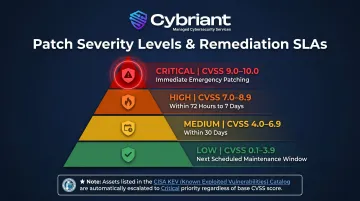
Prioritization must incorporate whether an exploit is actively circulating in the wild. CISA's Known Exploited Vulnerabilities (KEV) catalog identifies vulnerabilities with active exploitation, requiring escalation to emergency patching regardless of base CVSS score.
Testing and Staging
Once patches are prioritized, the next step is validating them before they reach production. Deploying untested patches can introduce compatibility issues, break integrations, or trigger unplanned downtime.
Best practice validation sequence:
- Deploy patch to isolated staging environment that mirrors production
- Test application functionality and integrations
- Verify performance and stability
- Document rollback procedures before production deployment
Deployment and Verification
Phased deployment strategies reduce risk:
- Pilot group - Deploy to small subset of systems first
- Monitoring phase - Watch for issues before wider rollout
- Batch rollout - Deploy in waves rather than all at once
- Maintenance windows - Schedule during low-usage periods
Deployment must be followed by active verification: scanning systems to confirm patches are successfully installed and flagging exceptions where patches could not be applied.
Documentation and Reporting
Maintain complete records of patch activities:
- Which patches were applied
- To which systems
- When deployment occurred
- Results and exceptions
This documentation supports compliance audits and demonstrates due diligence to regulators and cyber insurers. Patch completion rates tracked over time also reveal systemic gaps in coverage, giving teams the data they need to continuously refine the lifecycle.
Common Enterprise Patch Management Challenges
Asset Sprawl and Visibility Gaps
Large enterprises struggle to maintain accurate, real-time inventory across hybrid environments - on-premises, cloud, remote endpoints, and OT/IoT. Assets that aren't tracked can't be patched, creating dangerous blind spots. Continuous automated discovery and centralized management platforms help address this challenge by detecting new assets as they connect to the network.
Downtime Sensitivity and Business Resistance
Mission-critical systems often have strict uptime requirements, and business stakeholders resist patching windows that disrupt operations. Rather than delaying patches without accountability, organizations should formalize risk acceptance processes with executive sign-off for patch deferrals and implement compensating controls in the interim.
Patch Volume and Alert Fatigue
Enterprise IT teams face overwhelming volume: over 52,000 CVEs were reserved in 2024 alone, up from 40,000 in 2023. Manually triaging every patch is unsustainable. Without a risk-based framework backed by threat intelligence, teams waste effort on low-impact patches while critical gaps remain open.
The good news: scope is manageable when you focus on what's actively exploited. Cisco's "Prioritization to Prediction" report found that the CISA KEV catalog covers only 0.5% of all vulnerabilities - meaning teams that prioritize known exploited vulnerabilities first can dramatically reduce their remediation backlog.
Legacy Systems and Technical Debt
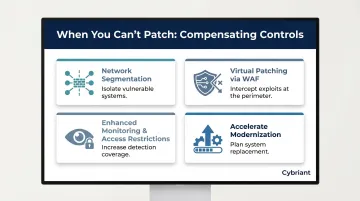
Older systems may no longer receive vendor patches, or applying patches may require expensive re-testing of custom applications. Organizations must weigh the risk of leaving legacy systems unpatched against the cost of interim workarounds. Common options include:
- Network segmentation to isolate vulnerable systems
- Virtual patching via Web Application Firewalls (WAFs)
- Enhanced monitoring and access restrictions
- Accelerating modernization and replacement plans
Best Practices for Enterprise Security Patch Management
Implement a Formal, Written Patch Management Policy
A documented policy defines:
- Scope of systems covered
- Roles and responsibilities (who owns what system, who approves exceptions)
- Patching SLA timelines by severity
- Testing requirements before production deployment
- Exception management procedures
Without a written policy, patching becomes reactive - and reactive patching is how unplanned downtime and compliance gaps happen.
Automate Wherever Possible
Manual patch management at enterprise scale is unsustainable. Automated tools can handle:
- Patch scanning and vulnerability identification
- Risk-based prioritization
- Staging and testing workflows
- Deployment scheduling
- Verification and compliance reporting
Automation still requires clear policy configuration to work correctly, and human oversight remains essential for high-risk edge cases and strategic decisions.
Align Patching Cadence with Vendor Release Cycles
NIST SP 800-40 Revision 4 recommends aligning regular patching cycles with major vendor schedules - such as Microsoft's monthly Patch Tuesday - while keeping a separate out-of-band protocol for critical zero-day vulnerabilities.
This two-speed approach lets teams maintain operational stability without sacrificing the ability to respond urgently when it counts.
Foster IT and Security Team Collaboration
Even a well-timed patching cadence breaks down without the right people executing it. Patching sits at the intersection of IT operations (who deploys) and security (who identifies and prioritizes risk) - and when those teams operate in silos, critical patches fall through the cracks.
Effective collaboration includes:
- Joint patch governance committees
- Shared SLAs and success metrics
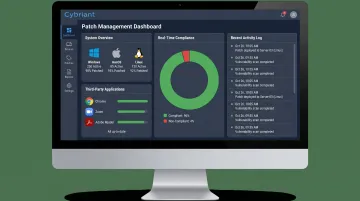
- Unified dashboards with real-time visibility
- Regular communication and coordination meetings
Establish Compensating Controls for Exceptions
When a patch cannot be applied immediately due to compatibility, legacy constraints, or business requirements:
- Document the exception formally
- Obtain executive approval for risk acceptance
- Implement interim controls such as:
- Network segmentation
- Enhanced access restrictions
- Increased monitoring and alerting
- Virtual patching via WAF (Web Application Firewall)
An unpatched system with no compensating controls and no remediation timeline is an open liability. Set a defined deadline for revisiting the exception and implementing the permanent fix - then hold to it.
When to Consider Managed Patch Management Services
The Enterprise Resource Challenge
Even organizations with dedicated IT teams often struggle to maintain consistent, timely patching across complex environments, particularly when those teams are pulled across multiple security priorities at once. The 55-day median time to remediate critical vulnerabilities demonstrates this challenge.
Managed security service providers (MSSPs) can take on the operational burden of patch monitoring, testing, deployment, and verification while freeing internal teams to focus on strategic security initiatives.
What to Look for in a Managed Patch Management Partner
Key capabilities include:
- 24/7 monitoring and response capabilities
- Real-time vulnerability scanning integrated with patch deployment
- Automated patch distribution across multiple operating systems and applications
- Compliance reporting aligned to regulatory frameworks
- Proven expertise across diverse enterprise environments
- SOC 2 Type 2 certification demonstrating rigorous security controls
Cybriant's patch management service covers Windows, Mac, and Linux systems, patches up to 800 third-party applications, and extends to remote and mobile devices. Backed by SOC 2 Type 2 certification and named to MSSP Alert's Top 250 MSSPs list for five consecutive years, the service handles patching operations so internal teams can stay focused on higher-priority security work.
Maintaining Internal Responsibility
Outsourcing patch management shifts the operational work - internal accountability stays in place. Organizations still need to:
- Define patching policies and SLA timelines
- Approve exceptions and risk acceptances
- Maintain visibility into patch posture
- Integrate with broader vulnerability management programs
The right MSSP acts as an extension of the security team, providing expertise and capacity rather than operating as a black box without oversight.
Frequently Asked Questions
What is security patch management?
Security patch management is the structured process of identifying, testing, and deploying software updates to close vulnerabilities, fix bugs, and maintain compliance across an organization's IT environment. It runs as an ongoing cycle governed by documented policies and measurable timelines.
What are the benefits of security patches?
Security patches reduce the risk of exploitation and data breaches by closing known vulnerabilities. They also maintain regulatory compliance, improve system stability, and prevent costly downtime. Cyber insurance underwriters increasingly treat a documented patch program as evidence of due diligence.
What are the common methods for security patch management?
Four approaches cover most enterprise environments:
- Automated platforms that handle scanning through deployment end-to-end
- Manual patching with documented workflows for complex or legacy environments
- MSSP-delivered patching where a managed security provider handles the full process
- Hybrid models that automate routine patches while routing critical updates to human review
What is the difference between vulnerability management and patch management?
Vulnerability management is the broader, continuous process of identifying, prioritizing, and remediating all security weaknesses including configuration issues and design flaws. Patch management specifically addresses applying software updates to close known vulnerabilities, making it a key component of - but not a replacement for - comprehensive vulnerability management.
Is patch management necessary?
Yes, patch management is essential. Unpatched systems remain one of the leading causes of enterprise breaches, with a 180% increase in vulnerability exploitation documented in 2024. Most compliance frameworks including HIPAA, PCI DSS, and GDPR explicitly require organizations to maintain patched, up-to-date systems.
What are best practices for security patch management?
A mature patch management program covers five areas:
- Asset inventory: Maintain continuous discovery so no system goes untracked
- Risk-based prioritization: Address the most critical vulnerabilities first, not just the most recent
- Automated deployment and verification: Reduce manual effort and confirm patches applied successfully
- Documentation: Record every action for compliance and audit readiness
- Formal policy: Define clear ownership, SLA timelines, and exception procedures in writing