Introduction
Healthcare remains the most targeted sector for cyberattacks, with ransomware now present in 44% of breaches - heavily fueled by unpatched vulnerabilities. When clinical workstations, EHR servers, and diagnostic imaging systems run outdated software, they create dual exposure: patient data becomes vulnerable to theft, and patient safety faces direct risk if ransomware locks critical systems during care delivery.
Automated patch management has evolved from an IT efficiency practice into a compliance imperative under HIPAA's Security Rule. The Office for Civil Rights explicitly states that risk management requirements extend to "risks and vulnerabilities to ePHI from unpatched software."
Manually tracking, testing, and deploying patches across a hospital's sprawling mix of clinical devices, administrative endpoints, and legacy systems is no longer realistic. The scale and complexity make it a security failure waiting to happen.
This article covers why automated patch management is non-negotiable for healthcare compliance, which features matter most in clinical environments, and what to look for in solutions built for the unique demands of healthcare IT.
Overview
- Automated patch management detects and deploys software updates across clinical and administrative endpoints to reduce ePHI exposure and meet HIPAA requirements
- HIPAA doesn't mandate a strict 30-day patching rule, but risk management obligations make timely, documented patching effectively mandatory
- The best healthcare solutions cover cross-platform OS patching, audit-ready reporting, and scheduling that protects clinical uptime
- Top tools include Ivanti Neurons, ManageEngine Patch Manager Plus, NinjaOne, Microsoft Intune, and Automox
- Smaller and mid-size healthcare organizations often benefit from partnering with an MSSP for 24/7 managed patch management oversight
Why Automated Patch Management Is Non-Negotiable in Healthcare
Automated patch management in healthcare is the systematic, policy-driven process of discovering, testing, and deploying software updates across clinical workstations, EHR servers, IoT/medical devices, and administrative endpoints - with minimal manual intervention. Unlike reactive, ticket-based patching, automation ensures vulnerabilities are remediated continuously and consistently across the entire environment.
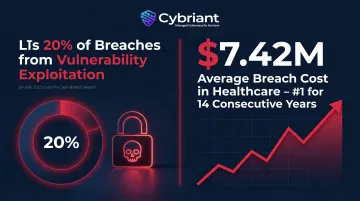
Vulnerability exploitation now accounts for 20% of all breaches and is the most common initial access method in ransomware attacks. The financial toll reflects that exposure: healthcare data breaches averaged $7.42 million in 2025, the highest of any industry for the 14th consecutive year. That combination of rising attack frequency and record-breaking breach costs makes unpatched systems a liability no healthcare organization can afford.
HIPAA doesn't use the word "patching," but the obligation is explicit. Under 45 CFR § 164.308(a)(1), covered entities must conduct risk analysis and implement risk management processes. The HHS Office for Civil Rights confirms this includes "risks and vulnerabilities to ePHI from unpatched software" and requires organizations to "apply patches or take other remedial actions as appropriate to reduce risks to a reasonable and appropriate level."
Automated patch management also satisfies two additional HIPAA requirements:
- 45 CFR § 164.312(a)(2)(iv) (Technical Safeguards) - requires access control mechanisms that protect ePHI from unauthorized modification
- 45 CFR § 164.312(b) (Audit Controls) - requires mechanisms to record and examine system activity; timestamped patch logs and compliance reports serve as direct remediation evidence
Key Features Healthcare Organizations Should Prioritize
HIPAA-aligned compliance reporting goes well beyond a dashboard summary. Auditors need granular, per-endpoint documentation - and generic views won't hold up under OCR scrutiny. Look for tools that produce:
- Device-level patch status reports for every endpoint
- Audit logs with timestamps, approver records, and change history
- Exportable compliance evidence in formats auditors can actually use
Clinical-uptime-aware scheduling recognizes that healthcare runs 24/7. Tools must support:
- Granular maintenance windows per device group
- Staged (ring-based) rollouts that test patches on pilot groups before broad deployment
- Rollback capabilities to reverse problematic updates without disrupting EHR availability or life-critical systems
Medical device and legacy system awareness is critical. 42% of computers in healthcare networks run unsupported operating systems, primarily Windows 7 and Windows 10 post-EOL systems still running on clinical devices. The tool should surface unpatched or end-of-life endpoints clearly and support compensating control documentation when patching is infeasible due to FDA-cleared device constraints.
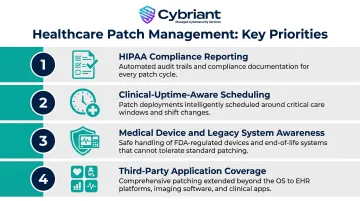
Third-party application coverage is where many tools fall short. OS and browser patches are baseline - but healthcare environments also depend on:
- EHR clients and DICOM viewers
- Clinical communication platforms
- Remote desktop software and browser plugins
Confirm the patch catalog explicitly covers these applications, not just standard OS updates.
Best Automated Patch Management Solutions for Healthcare Compliance
The following tools were evaluated on HIPAA compliance reporting depth, automation maturity, cross-platform coverage, clinical environment suitability, and market adoption in regulated industries.
Ivanti Neurons for Patch Management
A patch and vulnerability management platform built for complex, large-scale environments, with deep integration between risk scoring and automated remediation. It's widely used in healthcare and regulated industries for prioritizing patches based on real-world exploitability rather than CVSS score alone.
Key healthcare differentiators:
- Risk-based prioritization via Vulnerability Risk Rating surfaces actively exploited vulnerabilities first
- Unified endpoint management across Windows, macOS, and Linux
- Compliance dashboards aligned to HIPAA, PCI DSS, and other frameworks
Supports on-premises and cloud/hybrid deployment, accommodating strict data residency requirements common in health systems.
| Feature Category | Details |
|---|---|
| Key Features | AI-powered vulnerability prioritization, automated patch deployment and rollback, unified endpoint management, on-prem and cloud deployment options |
| Compliance Support | HIPAA-aligned audit logs, compliance policy enforcement, per-device reporting for audit readiness, SOC 2 Type 2 certified |
| Best For | Mid-to-large health systems and hospital networks with complex, mixed-OS endpoint environments |
ManageEngine Patch Manager Plus
Dedicated patch management platform supporting Windows, macOS, and Linux alongside a catalog of 1,100+ third-party applications. Available in both cloud and on-premises editions, making it a practical choice for health systems with strict data governance policies.
The broad third-party application catalog is the real differentiator here: EHR client applications and clinical productivity tools are more likely to be covered than with narrower platforms. Pilot-group (test ring) deployment workflows reduce the risk of patching-induced downtime. Compliance reporting maps to common regulatory frameworks and exports directly for HIPAA audit documentation.
| Feature Category | Details |
|---|---|
| Key Features | 1,100+ third-party app patching, staged deployment with test groups, scheduled automation, rollback support, distribution servers for WAN optimization |
| Compliance Support | Compliance reporting templates, audit trail logging, RBAC, integration with SIEM tools |
| Best For | Healthcare organizations with heterogeneous OS environments and a need for broad third-party application coverage |
NinjaOne
Cloud-native RMM platform with patch management as a core capability. Popular among MSPs managing healthcare clients and adopted by internal IT teams for its ease of use and rapid deployment profile.
Cross-platform OS patching (Windows, macOS, Linux), per-device compliance dashboards, and strong PSA and backup tool integrations set it apart. Its cloud-native architecture means remote clinical locations and telehealth endpoints patch without VPN dependency, which matters as healthcare expands distributed care models. Recognized as a G2 Leader in Spring 2026, reflecting strong user satisfaction and market adoption.
| Feature Category | Details |
|---|---|
| Key Features | Cross-platform OS and third-party patching, policy-based automation, real-time compliance dashboards, cloud-native off-network coverage |
| Compliance Support | Per-device patch status reporting, audit-ready logs exportable to CSV, MFA and RBAC enforcement |
| Best For | Healthcare MSPs and mid-size provider organizations seeking fast deployment and intuitive administration |
Microsoft Intune with Windows Autopatch
Microsoft's MDM and endpoint management platform, with Windows Autopatch automating Windows OS and Microsoft 365 update rings. The natural patching layer for healthcare organizations already standardized on Microsoft 365, Azure AD (Entra ID), and Microsoft Defender.
Simplicity and speed make it a strong fit for distributed clinical environments: no VPN required, and deployment across remote locations is fast. Compliance dashboards provide continuous visibility into patch posture, and native integration with Entra ID and Microsoft Defender consolidates identity, endpoint, and patch management in one ecosystem.
| Feature Category | Details |
|---|---|
| Key Features | Windows Autopatch update rings for OS and Microsoft 365, cross-platform device management (Windows, macOS, iOS, Android, Linux), policy-based configuration, cloud-native no-VPN deployment |
| Compliance Support | Audit logs, RBAC via Entra ID, endpoint compliance policies and dashboards, scheduled policy-driven deployment |
| Best For | Healthcare organizations already standardized on Microsoft 365 and Entra ID seeking native Windows patch automation |
Automox
Cloud-native, agent-based patch management platform that automates OS and third-party patching across distributed endpoints from a single console. Its lightweight agent suits healthcare organizations with remote clinical sites and limited on-site IT.
One planning note for healthcare decision-makers: Automox is a focused patch management tool, not a full RMM. Organizations will need to account separately for remote support, PSA ticketing, and backup integration. SOC 2 + SOC 3 and PCI-DSS v4 certified, demonstrating strong data protection practices relevant to regulated industries.
| Feature Category | Details |
|---|---|
| Key Features | Cross-platform patching, 580+ third-party apps, Worklets for custom scripted remediation, cloud-native no-VPN deployment |
| Compliance Support | Audit logs, RBAC, endpoint compliance dashboards, scheduled policy-driven deployment, SOC 2 + 3 certified |
| Best For | Healthcare organizations with distributed or remote clinical locations needing lightweight, fast-deploying patch automation |
What to Look for Before You Commit to a Platform
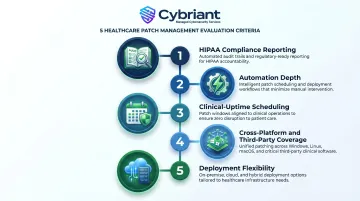
Before signing a contract, your compliance officer - not just your IT team - should validate the tool against these five criteria:
- HIPAA compliance reporting - output quality, audit trail completeness, and device-level detail
- Automation depth - coverage from initial discovery through verified deployment
- Clinical-uptime scheduling - controls that protect patient-care systems during patching windows
- Cross-platform and third-party coverage - support for healthcare-specific applications and endpoints
- Deployment flexibility - viability in both cloud and on-premises environments
Many healthcare IT teams select a tool based on ease-of-use scores or price alone - then discover the compliance reports can't survive an OCR audit or satisfy a cyber insurance questionnaire. Before committing, pilot the tool and export sample reports. Verify they contain device-level detail, timestamps, and the audit trail your compliance officer actually needs.
Here's the reality most tool comparisons skip: the platform is only as effective as the team running it. For healthcare organizations without a dedicated security function, the question isn't which tool to buy - it's whether you have the staff to configure it correctly, monitor it 24/7, and produce audit-ready documentation when OCR comes calling.
Cybriant's managed patch management service removes that burden entirely. We handle continuous vulnerability scanning, automated patch deployment, and HIPAA-aligned audit documentation - all backed by 24/7 SIEM monitoring. You don't need to choose a platform. We bring ours.
Conclusion
The right automated patch management solution for a healthcare organization isn't simply the one with the most features. It's the one that fits your actual environment. Look for a tool that:
- Closes vulnerabilities fast without disrupting clinical operations
- Generates audit-ready documentation that satisfies HIPAA requirements
- Fits your IT architecture and staffing reality
Before making a final decision, pilot two or three tools in your environment, validate compliance reporting output against your actual audit requirements, and confirm the vendor can sign a Business Associate Agreement (BAA) where ePHI may be processed or accessed.
For healthcare organizations that need more than a tool - that need ongoing managed patch management, 24/7 vulnerability monitoring, and compliance support - Cybriant delivers managed patch management, continuous vulnerability monitoring, and HIPAA compliance support so your team isn't left covering critical security gaps alone. Contact Cybriant or call 844-411-0404 to discuss how managed patch management can strengthen your security posture and compliance readiness.
Frequently Asked Questions
What is patching in healthcare?
Patching in healthcare refers to the systematic process of applying software updates to clinical workstations, EHR systems, medical devices, and administrative endpoints to fix security vulnerabilities, ensure system stability, and protect electronic protected health information (ePHI) in compliance with HIPAA requirements.
How often should patch management be performed?
Critical security patches should be applied as quickly as possible after testing - ideally within 30 days for high-severity vulnerabilities, a benchmark widely adopted in HIPAA risk management programs. Routine OS and application updates typically follow monthly cycles aligned with vendor release schedules and organizational maintenance windows.
Does patch management fall under vulnerability management?
Yes. Patch management is a subset of vulnerability management - where vulnerability management identifies and prioritizes weaknesses, patch management deploys the fixes. Together, they fulfill the HIPAA Security Rule's risk management requirement under 45 CFR § 164.308(a)(1).
What are general guidelines for patch management?
Core steps include:
- Maintain a complete asset inventory
- Continuously scan for missing patches and prioritize by risk severity
- Test patches before broad deployment using staged rollouts with rollback capability
- Document every action for audit trails
- Verify patch success post-deployment
What tool would be best used to manage compliance?
The best tool depends on your OS environment, organization size, and existing stack. For HIPAA compliance, prioritize tools that produce per-device audit logs, support BAA execution, and generate exportable compliance reports. Ivanti and ManageEngine are strong enterprise options; an MSSP like Cybriant adds 24/7 oversight for teams without dedicated security staff.
What are the top 5 cybersecurity threats in healthcare?
The five most prevalent threats are ransomware attacks on hospital systems, phishing targeting clinical staff, unpatched software vulnerabilities, insider threats and credential misuse, and medical device exploitation. Automated patch management directly mitigates vulnerability exploitation and reduces ransomware exposure from known weaknesses.